
IT support for Townsville not-for-profits, where every dollar has to do a job
Tech TroubleShooters helps not-for-profits, charities, clubs and community groups across Townsville and North Queensland keep their computers, email, phones and website working, and their members’ and donors’ details safe. We’ll tell you what you actually need and what you can skip, and we’ll explain it so the next committee can follow it too.
Sound like your organisation?
- “The old treasurer left and took the only password to the email account.”
- “Our volunteers use whatever laptop they’ve got at home.”
- “We’ve got donated computers of every age and nobody knows what’s on them.”
- “Nobody’s quite sure if the backups are actually working.”
- “We can’t really afford IT support. We can’t afford to lose the member list either.”
Not-for-profits run on goodwill, and goodwill doesn’t come with an IT department. Things get set up by whoever was keen at the time, then the committee changes and nobody knows how it all hangs together. That’s not a failure. It’s just how volunteer organisations work, and it’s very fixable.
Where the rules actually sit, in plain words
A plain-English summary, not legal advice.
The Privacy Act may not apply, but check the exceptions. Most organisations under $3 million turnover are exempt, and that includes many small not-for-profits. But the exemption doesn’t apply if you provide a health service and hold health information. That can include counselling, disability support or community health programs. It also doesn’t apply if you hold a Commonwealth contract, or if you’re related to a larger organisation that’s covered. You can also choose to opt in, which some funders like to see. If you are covered, the Notifiable Data Breaches scheme applies too.
Charity boards have a duty of care. If you’re a registered charity, the ACNC Governance Standards expect your responsible people to act with reasonable care and diligence. The ACNC’s own governance toolkit treats managing cyber risk as part of that.
Exempt or not, people expect you to look after their details. Both the OAIC and the ACNC recommend protecting personal information whether or not the law requires it. Members, donors and the people you help won’t check your turnover before they’re upset about a leak.
The free government guidance is a good place to start. The Australian Cyber Security Centre published a Small business cyber security handbook on 7 October 2026, and ASD Essentials, the successor to the Essential Eight, launched on 15 October 2026. The Essential Eight is still valid during the changeover. Neither is a certificate. They’re a sensible checklist, and we’ll tell you which parts matter for an organisation your size.

What we sort out for you
Accounts owned by the organisation, not by a person. We set up email and the website under the organisation’s accounts rather than a volunteer’s personal one, and we remove access when someone leaves. That way access doesn’t walk out the door with them.
Two-step sign-in on the accounts that matter, so a volunteer’s reused password doesn’t hand someone your member list. See multi-factor authentication.
An honest look at donated computers. We’ll check them, clean them up, and tell you plainly which ones are worth keeping and which will cost more in headaches than they’re worth. See computer repairs.
Backups that are encrypted and kept in Australia, for the files you couldn’t replace. See data backup.
Website and email hosted by us on secure Australian servers if you want them in one place. See web hosting.
For managed IT clients: monitoring, updates, security that stops ransomware by watching behaviour, and a plain-English monthly report you can table at a committee meeting. See managed IT.
Pay for what you need, not what we’d like to sell you
Plenty of small organisations don’t need full managed IT, and we’ll say so. You can have a fixed monthly price for the things you always need, and pay by the hour for the extras, like setting up a new laptop. Or just call us when something breaks. No lock-in contracts unless you ask for a set term.
Who you’ll be dealing with
Kelly Hunn has been fixing IT for more than 30 years, and Kelly and Carisa have run their own business since 2006. When you call, it’s Kelly or Carisa, every time. That matters when your contact person changes every year or two. The committee changes, but the people looking after your IT don’t. Usually one of us answers straight away. If we’re driving or on a job, we’ll call or text you back, usually within the hour.
Managed IT clients get 24/7 support at no extra charge. Everyone else can still call any time. After hours we’ll get back to you as soon as we can, but we can’t promise to start straight away.
We work with organisations across Townsville, Magnetic Island, Ayr, Ingham and Charters Towers, and a lot of help can be given remotely.

Questions committees ask us
Does the Privacy Act apply to our not-for-profit?
Many small not-for-profits under $3 million turnover are exempt. But you’re covered regardless of size if you provide a health service and hold health information, such as counselling or disability support, or if you hold a Commonwealth contract. If you’re unsure, the OAIC’s small business checklist is a good starting point, and a lawyer can confirm.
How do we stop losing access when volunteers or committee members leave?
Keep every important account in the organisation’s name rather than a volunteer’s personal one, and switch off access when people leave. We can set up email and logins that way, and remove access when someone moves on.
Are donated computers safe to use?
Some are, some aren’t. A donated computer may be too old to get security updates, or still have the previous owner’s files on it. We’ll check each one, wipe and set it up properly, and tell you honestly if it’s not worth the trouble.
We’re tiny. Do we really need managed IT?
Not always. If you have a few volunteers and one shared laptop, calling us when something goes wrong may be enough. If you hold sensitive information, have paid staff or rely on your systems every day, managed IT usually makes sense. We’ll tell you which we think fits, even if it’s the cheaper option.
The faces on this page are the people who answer the phone. Odd thing to have to point out, really.
The same two people look after every not-for-profit we work with. So in month six, you're still not explaining your setup to a stranger.
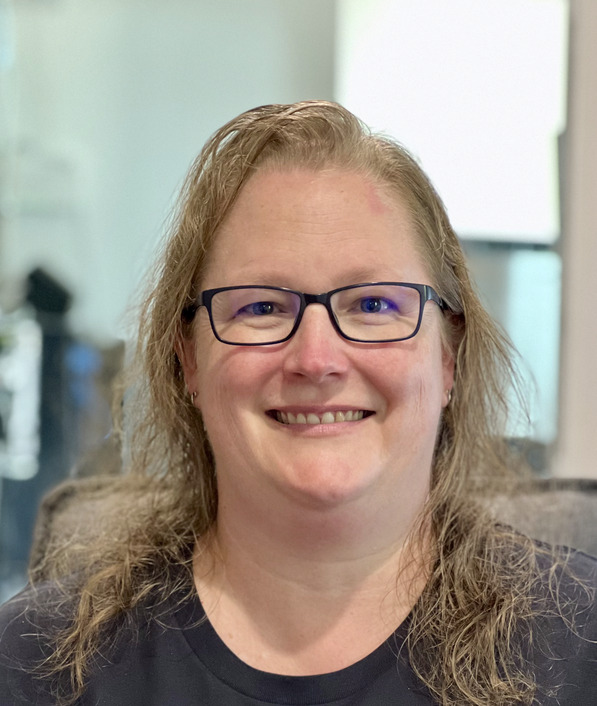
Carisa
The calm voice on the other end when things go wrong.

Kelly
30+ years fixing IT. Has seen most problems before, some of them twice.


Usually one of us answers straight away. If we're driving or on a job, we'll call or text you back, usually within the hour.
Managed IT clients get 24/7 support at no extra charge.
We put our own mobiles on the website. Most IT companies would rather not. That's sort of the point.
Tell us what's bugging you.
Talk it through with Kelly or Carisa. They’ll ask about your accounts, computers, backups and email, and tell you what’s fine, what needs fixing, and what you can safely leave alone.
No lock-in contracts. If we stop being good, you're free to go. We'd rather you didn't.
Leave your number and Kelly or Carisa will call you back, usually within the hour, and within one business day at the latest.
Busy? We'll ring you.
Leave your number and tell us what's not working. We'll take it from there.